Character Sheet: one photo, three views, the same human everywhere
You send one photo of someone. You get back a realistic photo sheet in three panels: front full-body, back full-body, and a close-up portrait. It is the first image to make before any video with a character in it.
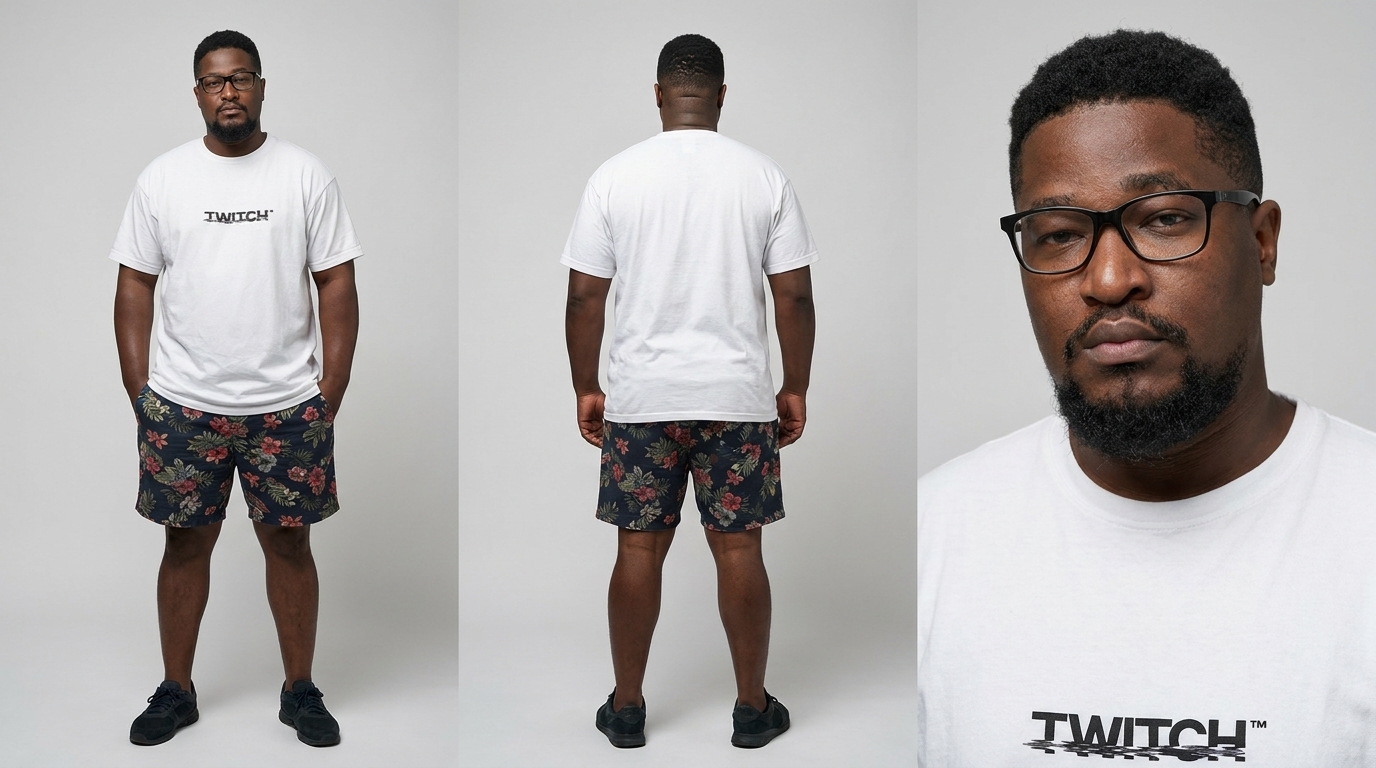
Three panels side by side, light grey background, studio light. The same person from the front, from the back, then in a tight portrait. Same face, same hair, same outfit, same proportions. It looks like a location scouting shoot, not a generated image.
You gave one photo. The prompt does the rest, and above all it forbids the model everything it loves to add: smoothing, 3D rendering, text, beauty filters.
This is the prompt I run first on every project. Every video on this site that shows a character started with a sheet like this one.
The whole process
- 1 Pick one sharp photo of the person, front or three-quarter, well lit, no sunglasses or hat hiding the face.
- 2 On Pelikulart, go to Generate → Image, select Nano Banana Pro, 16:9, 1K quality for a first run.
- 3 Add the photo as the reference (
@img1). - 4 Paste the prompt as it is. If the outfit in the photo is not what you want, add one line at the end describing the one you want.
- 5 Generate. Check the face on the close-up, then the feet on the full-body views.
- 6 Keep the sheet: it is your
@img1reference for every video that follows.
What you need before you start
One file.
| Slot | What it is | What it controls |
|---|---|---|
| @img1 | One sharp photo of the person | Face, hair, proportions, outfit |
Everything else, the three views, the background, the light, the photographic finish, is written in the prompt.
The prompt
Create a photorealistic character reference sheet of the person in the attached photo. Three panels: front full-body, back full-body, and a close-up portrait. Preserve the exact face, hairstyle, body proportions, and outfit across all views. Real human photographed in a studio: natural skin pores, subtle imperfections, individual hairs, realistic fabric texture and folds. Relaxed posture, anatomically correct hands, feet fully visible. Plain light-grey background, soft neutral lighting, sharp focus. Photography only—not illustration, cartoon, CGI, or a 3D render. No beauty filter, plastic skin, text, or watermark.
One paragraph, no more. Every sentence closes a door the model usually escapes through.
“Three panels: front full-body, back full-body, and a close-up portrait.” The number and content of each panel are named. Say “several views” and you get four, five, six thumbnails of different sizes, and the back is almost always missing.
“Real human photographed in a studio: natural skin pores, subtle imperfections, individual hairs.” This is the anti-plastic line. Left alone, the model smooths skin and melts hair into one mass. Asking for pores and individual hairs forces it to render a real photograph.
“Relaxed posture, anatomically correct hands, feet fully visible.” Hands and feet are where images fail. Naming them is often enough to get them right, and “feet fully visible” stops the framing from cropping the shoes, which matters for the video later.
“Plain light-grey background, soft neutral lighting.” The sheet is not a nice picture, it is a specification. A neutral background and flat light let the video model relight the person into any scene.
“Photography only” then the list of bans. Illustration, cartoon, CGI, 3D render, beauty filter, plastic skin, text, watermark. Each of those words is a drift I have seen happen. The prompt refuses them by name.
Change the outfit without losing the person
The prompt keeps the outfit from the photo. To change it, add one sentence at the end, describing the clothes piece by piece, like this:
Outfit for all three panels: dark cyan cotton pyjama set, long sleeves, straight trousers, bare feet. Clear-frame glasses. Nothing else changes: same face, same hair, same body.
The last sentence matters as much as the description. Without “nothing else changes”, the model uses the outfit change as an excuse to change the hair or the build too.
Check before you move on
A sheet is judged in three looks. The close-up first: is this the person from the photo, same nose, same mouth, same hairline? Then the two full-body views: are the feet in frame, do the hands have five fingers? Finally the back: are the hair and the garment consistent with the front?
If any of the three fails, run it again. A sheet costs a handful of cauris. A video built on a bad sheet costs ten times more, and the flaw repeats on every shot.
Using it for video
Once the sheet is validated, it becomes your @img1 reference for Seedance 2.5 or Kling 3.0. You can send it whole, or crop the front full-body view when a tutorial asks for it. The video model finds everything it needs in it: the face on the portrait, the silhouette on the full-body views, the back for the shots where she turns.
That is exactly what the Storm Crowd tutorial does with a five-view sheet. Three views are enough in most cases.
Making it your own
- The outfit. Add the line from section 02 with your clothes, piece by piece, and keep “nothing else changes”.
- The number of views. Three by default. Go to five (add a three-quarter and a profile) if your character turns a lot in the video.
- The format. 16:9 for three panels side by side. In 1:1 the panels get too small.
Keep everything else: the grey background, the flat light, the list of bans.
Where it goes wrong
| What you got | The fix |
|---|---|
| Three different people | The sentence "Preserve the exact face… across all views" is missing or shortened. Put it back whole. |
| Smooth skin, plastic look | Keep "natural skin pores, subtle imperfections, individual hairs" and "No beauty filter, plastic skin". |
| Feet cropped | "feet fully visible" must stay. If it persists, add "full body from head to shoes, with space below the feet". |
| Six fingers, melted hands | Run again with "anatomically correct hands, five fingers, hands relaxed at the sides". |
| Text or labels on the sheet | "No text, or watermark" is there for that; add "no labels, no numbers" if the model numbers the views. |
| A decorated background or a visible floor | Strengthen "plain light-grey background, no floor line, no props". |
| The outfit changes between front and back | Describe the outfit piece by piece and end with "nothing else changes". |
| The face does not match the photo | Your source photo is blurry, in profile or too small. Use a sharp, well-lit, front-facing photo. |
Why Pelikulart
Images and video in one place
The reference sheet and the video in the same account, nothing to move.
Mobile money, in FCFA
MTN, Moov, Wave, Orange, card. No international card required.
Minutes, not days
Paste, generate, wait. Nothing to install.
Make yours in the next 40 minutes
You have the whole prompt and every setting. The only thing left is an account, and that takes a minute.
Open Pelikulart ↗No subscription: cauris from 990 FCFA, payable by mobile money.