 9/10 from 990 FCFA no subscription
Pelikulart review: image, video and sound in one place, paid in FCFA
The AI studio you can pay for with mobile money, no international card needed.
The short version
I founded it, so read with that filter: it is the tool I open first for client work, and it still has gaps.
What's good
- ✓Seedance 2.5, Kling 3.0, Veo 3.1 in one interface
- ✓Mobile money and card payments, in FCFA
- ✓French interface and Ivy prompt assistant
- ✓Simple @img, @video, @audio reference slots
What isn't
- —Fewer expert settings than each provider's own site
- —No unlimited plan, credits only
- —Young platform, still a small community
What it’s actually good at
First thing to say: I founded Pelikulart. I am not neutral and I will not pretend to be. What I can do is tell you what I see when I use it on paid jobs in Cotonou and Abidjan, and where it still slows me down.
What it does well is put in one place what I used to keep open in four tabs. On the video side you get Seedance 2.5 (up to 30 seconds, 720p or 1080p, a 30 second reference video, up to 30 images, native sound), the three Seedance 2.0 variants (standard, Fast, Mini), Kling 3.0 and 3.0 Turbo, Veo 3.1 and 3.1 Fast, Runway and Grok Video. On the image side, Nano Banana 2 and Pro, GPT Image 2, Flux, Imagen 3 and Grok Aurora. For sound, ElevenLabs voices and Suno music. All of it in French, payable by mobile money (MTN, Moov, Wave, Orange) or by card, in FCFA, through KkiaPay and PawaPay. For me that is the real difference: I no longer need a dollar card to deliver a video.
References are named @img1, @video1, @audio1. You add your files, mention them in the prompt, and everything you added goes to the model. Ivy, the built-in assistant, helps you write or tighten a prompt when you are stuck.
Where I’d actually start
Sign up and take the 990 FCFA Chap Chap pack, 200 cauris. That is enough for about ten images or a first short video. Make one image with Nano Banana 2 to see the interface, then buy the Chap Chap pack: 200 cauris for 990 FCFA. With that you can test one real short video.
For your first video, pick Seedance 2.5, 16:9, 10 seconds, 720p, and follow the Crowd in the storm tutorial: one reference video, one character image, one prompt. It is the shortest path to something you can show someone.
Where it costs you
There is no unlimited plan. You buy cauris: Chap Chap 200 (990 FCFA), Starter 1,300, Pro 3,000, Studio 8,000. A 10 second Seedance 2.5 video at 720p costs around 140 to 300 cauris depending on sound and resolution. If you iterate a lot, it adds up fast, same as anywhere else. Do your tests short and at 720p, then switch to 1080p only on the shot you have approved.
Second honest point: for each model you get fewer expert settings than on the provider’s own site. If you want Kling’s multi-shot mode with every slider, Kling’s site offers more. Pelikulart picks simplicity, and sometimes you miss the knobs.
Third: the platform is young. The community is smaller, there are fewer shared examples, and the interface is designed French-first. If you work in English it is usable but not native.
Who should use it
If you are a creator, editor or small agency in French-speaking Africa, you deliver reels and spots to clients and you want to pay from your phone, this is the tool I recommend first. If you are an expert in one model, want all its settings or an unlimited plan, use that provider’s site, and come back here for everything else.
Prompts that run on it
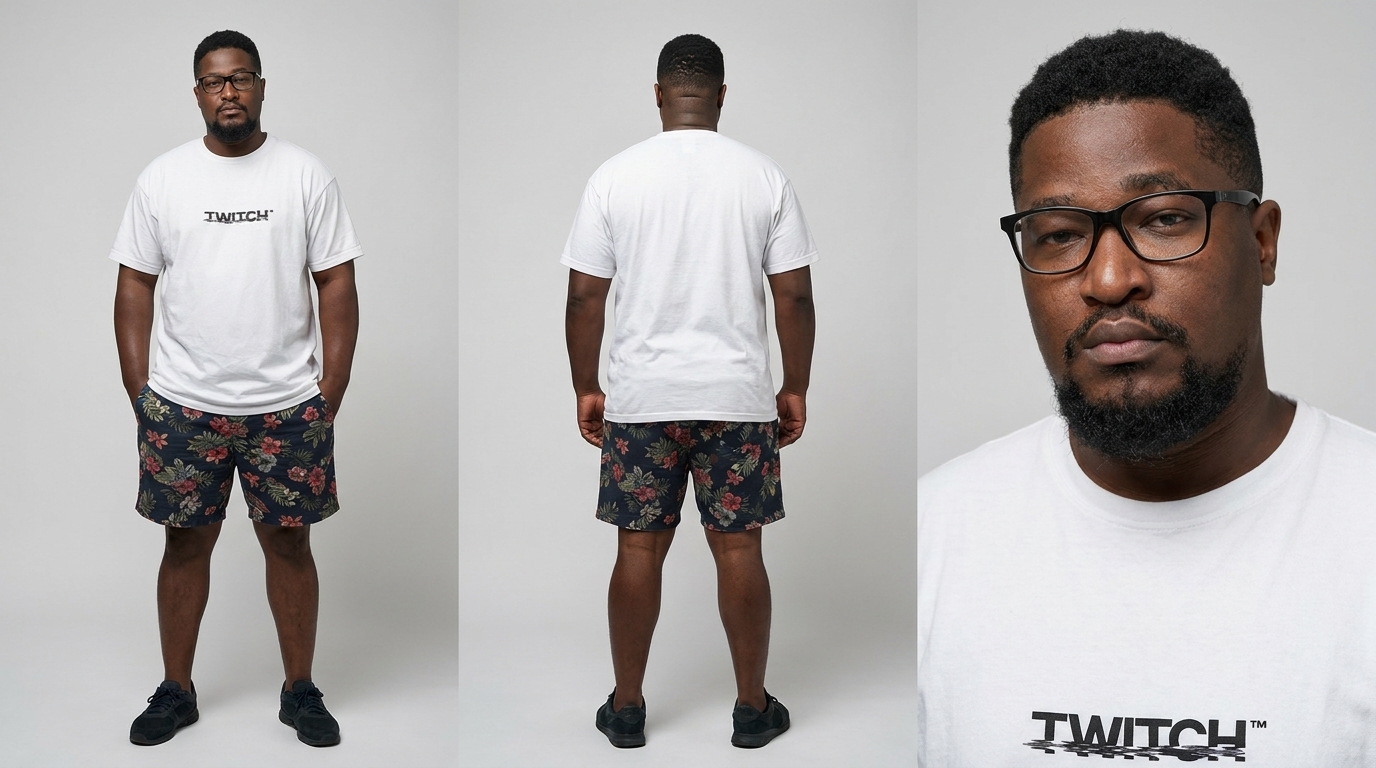
Character Sheet: one photo, three views, the same human everywhere
You send one photo of someone. You get back a realistic photo sheet in three panels: front full-body, back full-body, and a close-up portrait. It is the first image to make before any video with a character in it.
Storm Crowd: keep the movement, replace everyone
A hundred people move as one. One woman in a lime blazer does not move at all. You give the model a reference video and a single image of your character. It rebuilds everything else.